
Cool FormKit » Features » Conditional GetResponse
Share it:
Easily send form data to GetResponse only when conditions are met, perfect for targeted subscriptions and smarter email automation.

Want to send form data to GetResponse only when specific conditions are met?
The Cool FormKit plugin makes it easy to connect your Elementor form with GetResponse using smart conditional logic. Send user data to your email list only when they meet certain criteria, like opting in, selecting an option, or entering a specific value. Perfect for collecting genuine subscribers, improving list quality, and creating more targeted email campaigns without adding every submission automatically.
It works with:
No Elementor Pro? No problem! Just install Cool FormKit and start sending form data to GetResponse with smart conditional logic for targeted email automation today.
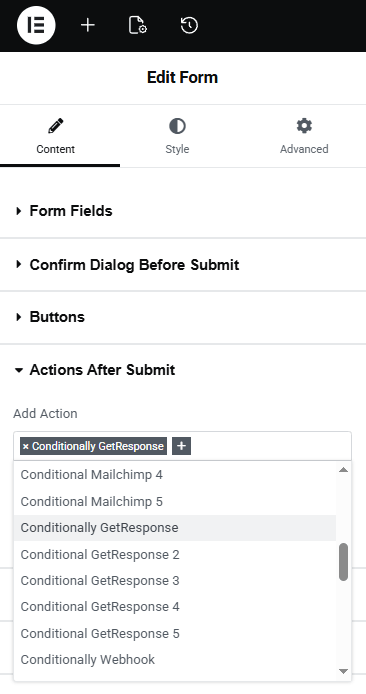
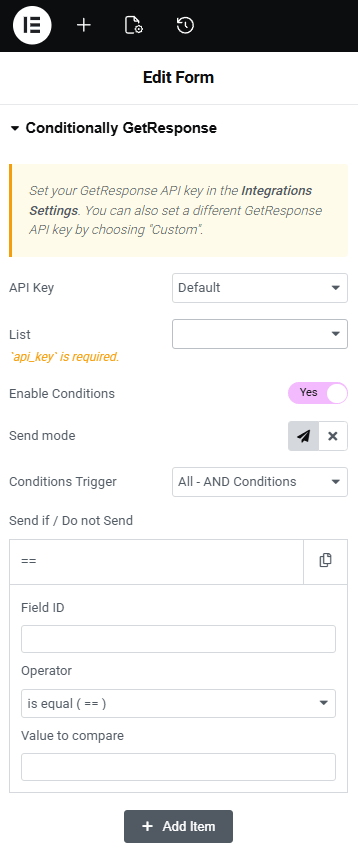
The Conditional GetResponse feature in Cool FormKit is easy to set up and manage inside Elementor forms. You can quickly control how and when user data is sent to your GetResponse list with just a few clicks.
These flexible settings help you match the rating field with your form design and website style effortlessly.
Conditional GetResponse allows you to send form data to your GetResponse list only when specific conditions are met, such as when a user selects an option or checks a box.
Yes, you need to connect your GetResponse API key in Cool FormKit settings before configuring conditional actions in your form.
If the condition is not satisfied, the form data will not be sent to GetResponse, ensuring only relevant users are added to your email list.

 The plugins are excellent and their customer support is also quick and friendly
 Excellent plugin very easy to use and extremely fast response to my support email, would highly recommend
 This plugin is easy to use and does what it has to do. Most important: The support is quick and solve your issues!
 Thank you so much! Great plugin! It make my whole website very cool! Also great service!
 It’s a nice plugin, easy to install and very good support, even for free version, my questions are answered!
 Great software and friendly service. They helped me very quickly solve an issue I created myself. Highly recommend.
 Good quality program.
You can saving many time.
And good support team.!
Very quickly support fix problem and very kindly
Good quality program.
You can saving many time.
And good support team.!
Very quickly support fix problem and very kindly
Use Cool FormKit to add a beautiful rating field in Elementor form along with 20+ others advanced fields & features.
We want you to love our plugins. If it’s not the right fit, you’re covered by our 14-day money-back guarantee.


Upto
OFF

Ends in
 Read
Read