

Cool FormKit » Features » Conditional Webhook
Share it:
Route form submissions to different webhook URLs automatically based on user input using Conditional Webhook in Elementor form.

Want to send form submissions to different webhook automatically based on user input?
The Cool FormKit plugin lets you easily add a powerful Conditional Webhook to your form. Instead of sending all submissions to one fixed URL, you can route data to different webhook URLs based on selected options like Sales, Support, Feedback, or any custom field value.
It works with:
No Elementor Pro? No problem! Just install Cool FormKit and start creating smart, condition-based webhook integrations in your forms today.
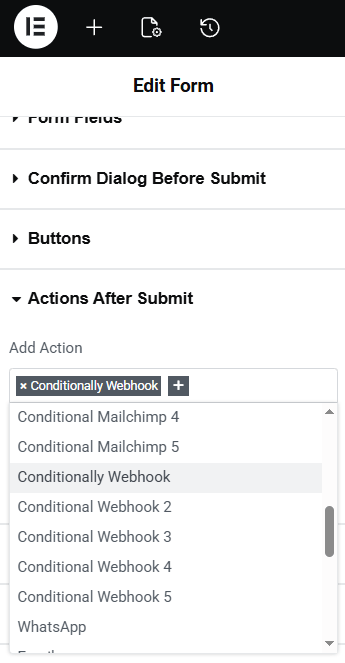
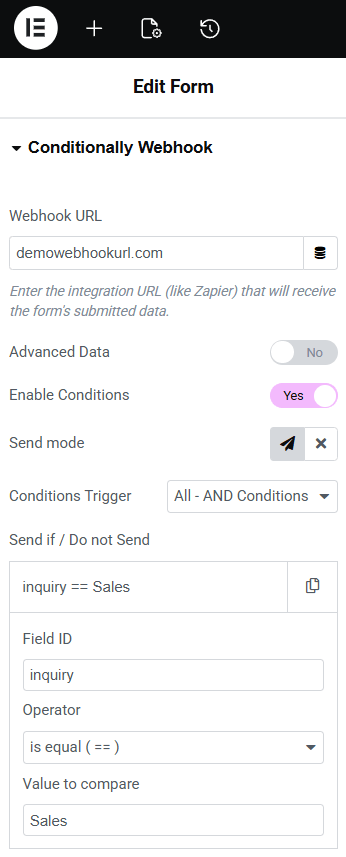
To add a Conditional Webhook, edit your form in Elementor and go to Actions After Submit. Select Conditionally Webhook, then enter your webhook URL and enable conditions. Configure the field ID, comparison operator, and value to control when the webhook should trigger.
Yes. You can use Conditional Webhook with Elementor Pro Form widget, and also with Elementor Free by using Hello Plus (form lite widget), Pro Elements plugin, or the Cool FormKit form widget.
Yes. You can add multiple conditional webhook actions and route submissions to different URLs based on user input.

 Thank you so much! Great plugin! It make my whole website very cool! Also great service!
 The plugins are excellent and their customer support is also quick and friendly
 This plugin is easy to use and does what it has to do. Most important: The support is quick and solve your issues!
 It’s a nice plugin, easy to install and very good support, even for free version, my questions are answered!
 Excellent plugin very easy to use and extremely fast response to my support email, would highly recommend
 Great software and friendly service. They helped me very quickly solve an issue I created myself. Highly recommend.
 Good quality program.
You can saving many time.
And good support team.!
Very quickly support fix problem and very kindly
Good quality program.
You can saving many time.
And good support team.!
Very quickly support fix problem and very kindly
Use Cool FormKit to add a beautiful range slider field in Elementor form along with 25+ others advanced fields & features.
For 1 Website • Cool FormKit - Yearly
For 1 Website • Cool FormKit - Lifetime
We want you to love our plugins. If it’s not the right fit, you’re covered by our 14-day money-back guarantee.

Manage your preferences. Blocking some cookies may affect site features. You can find more information in our Cookie Policy and Privacy Policy.
Your browser is sending a Global Privacy Control signal, so advertising cookies stay off and that choice cannot be switched on here. Everything else is still yours to decide.
Essential cookies for site security, functionality and basic preferences.
| Cookie | Set by | Kept for |
|---|---|---|
cppb_consent
Stores the visitor's consent decision so the banner is only shown once.
|
CP Cookie Banner | configurable (default 365 days) |
Remember your preferences, like language and layout, for a better site experience.
| Cookie | Set by | Kept for |
|---|---|---|
cppt_session
Marks the current browsing session, so that a visit arriving from another website is credited once per session rather than on every page view. Contains no identifier.
|
Cool Plugins — CP Pricing Table | Session |
wp-settings-1
Stores user admin preferences.
|
WordPress core | 1 year |
wp-settings-time-1
Stores user admin preferences.
|
WordPress core | 1 year |
Help us improve the site using anonymous usage data, without personal targeting.
| Cookie | Set by | Kept for |
|---|---|---|
_clck
Persistent user identifier for session linking.
|
Microsoft Clarity | 1 year |
_clsk
Connects pageviews into a single session recording.
|
Microsoft Clarity | 1 day |
_ga
Distinguishes unique users.
|
Google Analytics | 2 years |
_ga_942V83ZG8Q
Persists session state per GA4 property.
|
Google Analytics 4 | 2 years |
Used to deliver and measure ads on this site and across the web.
| Cookie | Set by | Kept for |
|---|---|---|
_fbp
Identifies browsers for ad delivery and site analytics.
|
Meta (Facebook) Pixel | 3 months |
_gcl_au
Stores conversion linker information for Google Ads.
|
Google Ads | 90 days |
_rdt_uuid
Unique visitor identifier for Reddit ad attribution.
|
Reddit Pixel | 3 months |
_twpid
Identifies the browser to X so ad conversions can be attributed.
|
X (Twitter) Pixel | Session |
_twsid
Session identifier used by the X conversion pixel.
|
X (Twitter) Pixel | Session |
 Read
Read