
Cool FormKit   »   Features    »   Input Mask

Share it:

Input Mask for Elementor Form

Guide users to enter data in a specific format using input masks in your Elementor form fields.
Excellent Support Team
Input Mask for Elementor Form

Add Input Masks to Your Form

Want to ensure users enter data in the correct format?

The Cool FormKit plugin lets you easily apply input masks to form fields in Elementor. Whether it’s phone numbers, dates, or postal codes, it guide users with a predefined format as they type!

It works with:

  • Elementor Pro form widget
  • And also with Elementor Free using:
    • Hello Plus (form lite widget)
    • Pro Elements plugin
    • Cool FormKit (cool form widget)

No Elementor Pro? No problem! Just install Cool FormKit and start creating smart forms with advanced input formatting like Input Masks today.

Input Mask Settings

The Input Mask feature in Cool FormKit gives you complete control with simple settings inside Elementor’s form widget. You can define how users should enter data and ensure consistent formatting with just a few clicks. Available Options:

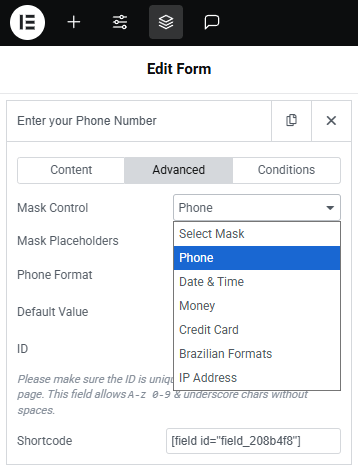
  1. Mask Type – Choose a predefined format like phone number, date, credit card, etc.
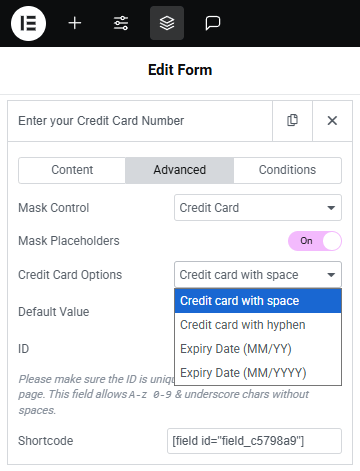
  2. Mask Placeholder – Show a visual guide to help users understand the expected format.
  3. Show Format on Focus – Display the input format only when the user clicks into the field.
  4. Field Type – Works seamlessly with text-based fields.

These options help you control user input and ensure your form collects clean, structured data, perfectly aligned with your website’s functionality.

FAQs

What is an Input Mask in Elementor forms?
An input mask is a predefined format that guides users to enter data in a specific pattern, such as phone numbers, dates, or zip codes. It helps maintain consistency and avoids formatting errors.
Yes! With Cool FormKit’s custom form widget, you can use input masks even if you’re not using Elementor Pro. Just install Cool FormKit and start adding advanced fields easily.

Cool FormKit supports a wide range of masks including Phone Numbers, Dates, Time, Credit Card, Brazilian Formats, and IP Address.

Yes, you can enable Mask Placeholder to display the format as a guide while users type, making it easier to understand the required input format.

Input masks help users enter data in the correct format, reducing errors and making your forms more reliable and user-friendly.

  • Ensures consistent data entry
  • Prevents formatting mistakes
  • Guides users with a visual format
  • Makes complex inputs like phone numbers or dates easier
  • Saves time in data validation

Here are some practical examples where input masks are especially useful:

  • Phone numbers (e.g., +91 98765-43210)
  • Dates (e.g., 18/07/2025 or MM/DD/YYYY)
  • Postal or ZIP codes
  • Credit/debit card numbers
  • Social security or ID numbers
  • Custom product or booking codes

Input Mask Demo

Checkout Form With Smart Input Masks

Real Feedback from Our Plugin Users

Our WordPress plugins are trusted for their quality, compatibility and excellent customer support.
Cool FormKit - Advanced Form Builder for Elementor

Pricing Plans

Use Cool FormKit to add Input Mask for Elementor form along with 20+ others advanced fields & features.

Annual License

For 1 Website • Cool FormKit - Yearly

21% OFF $49 $39 / year
Buy Plugin — $39
Extra discount available —
  • Use on 1 website
  • 1 year of plugin updates
  • 1 year of premium support
Best Value

Lifetime License

For 1 Website • Cool FormKit - Lifetime

17% OFF $119 $99 / one-time
Buy Plugin — $99
Extra discount available —
  • Use on 1 website
  • Lifetime plugin updates
  • Lifetime premium support
14-Day Money Back Guarantee

We want you to love our plugins. If it’s not the right fit, you’re covered by our 14-day money-back guarantee.

Secure SSL encrypted payment by PayPal & Stripe (Credit & Debit Cards)
secure payment modes
